The ClearDashboard is a resource to help you find hearing aids.

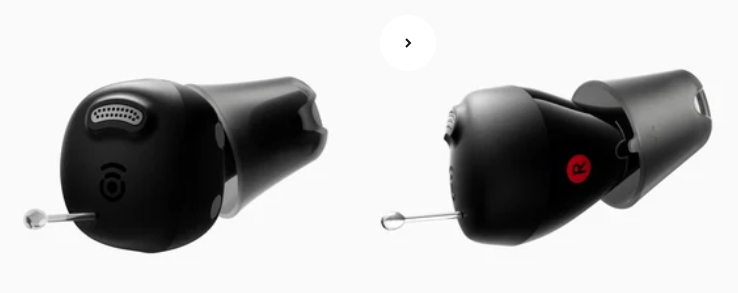
Nano
- Model
- Nano
- Company link
- cearvol.com (Opens in New Tab)
- Color
- Starlight; Midnight
- Price per Pair 1
- $219.00
Basic
- Model
-
Nano
- Company link
- Color
-
Starlight; Midnight
- Price per Pair 1
-
$219.00
General
- Power for the device (battery options)
-
Rechargeable

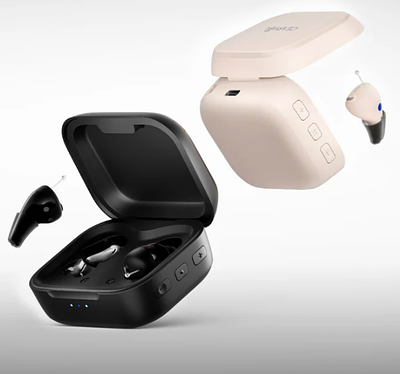
The company reports 17 hours of battery usage per charge. Battery life with the charging case is reported to be 54 hours.
- Charger
-
Yes
A USB-C charging cable is provided with the charger but a power adapter will need to be purchased separately. The charger can function as a remote control with separate buttons for right and left ear hearing aid volume increase, volume decrease and mode adjustments. A hearing aid UV sterilization function is available only if the hearing aids are placed in the charger, the charging case is connected to power and the lid is closed.
- How is the volume controlled?
-
on Charging Case
The hearing aid has 4 volume levels. Volume can be adjusted by pressing the volume up or volume down buttons for the right and left ear hearing aid. The Preset Program button on the right side of the charging case provides gain adjustments for 3 types of hearing loss (Mild, Mild-to-Moderate, Moderate-to-Severe).
- Programming personalization required before hearing aid use.
-
No
Press the Mode button on the left side of the charging case to cycle through the 3 modes (Indoor, Restaurant, Outdoor). The hearing aid has a memory function that can automatically recall the last-used volume and mode setting when turned back on. The Preset Program button on the right side of the charging case provides gain adjustments for 3 types of hearing loss (Mild, Mild-to-Moderate, Moderate-to-Severe).
- How do I fine-tune the device?
-
on Charging Case
The hearing aid has 4 volume levels. Volume can be adjusted by pressing the volume up or volume down buttons for the right and left ear hearing aid. The Preset Program button on the right side of the charging case provides gain adjustments for 3 types of hearing loss (Mild, Mild-to-Moderate, Moderate-to-Severe).
- Bluetooth used to connect to a smartphone app
-
No
- Bluetooth used to deliver (stream) sound from smart phone to hearing aid
-
No
- Remote control option
-
Yes
The charging case can serve as a remote control.
- On/Off Control
-
No
Remove from charger to turn On and place in charger to turn Off.
- Telecoil (T-Coil)
-
No
- Accessories
-
Yes
Contact the company for any replacement parts.
- Water resistant
-
Yes
IPX5
- Warranty
-
3-year warranty
Check with the manufacturer on the specifics of the warranty policy and procedures. Warranty may be subject to retailer-specific conditions.
- Can this device be returned?
-
Yes
45 day return policy. Check with the manufacturer on the return policy and procedures. Call TEL: 959-206-0088 to schedule a return. Return policy may be subject to retailer-specific conditions.
Support
- Customer Support Prior to Ordering
-
Yes
Contact the company for customer support on their website, by Email: support@cearvol.com or Telephone: 959-200-8878.
- Customer Support After You Receive the Device
-
Yes
Contact the company for customer support on their website, by Email: support@cearvol.com or Telephone: 959-206-0088.
User Experience
- Satisfied with opening the box and setting up the device 2
-
The score will be available when testing is complete.
- Satisfied with the amount of time it took to open the box and set up the device 3
-
The score will be available when testing is complete.
- Satisfied with the support information that was available (online help, documentation, instruction booklets, etc.) 4
-
The score will be available when testing is complete.
- Satisfied that opening the box and setting up the device was easy 5
-
The score will be available when testing is complete.
- The physical comfort of the device in the ear (after wearing it during the testing procedures) 6
-
The score will be available when testing is complete.
- The physical fit (can user get it in their ear and have it stay in their ear) 7
-
The score will be available when testing is complete.
- Appearance (does the user like the way it looks in their ear) 8
-
The score will be available when testing is complete.
- Set up time 9
-
The score will be available when testing is complete.
- Required assistance in setting up the device 10
-
The score will be available when testing is complete.
Listening Performance
- Sound quality of speech 11
-
The score will be available when testing is complete.
- Sound quality of music 12
-
The score will be available when testing is complete.
- Overall Listening Experience (OLE) 13
-
The score will be available when testing is complete.
- CLEARScore 14
-
The score will be available when testing is complete.
Last Updated: August 17, 2026
Glossary
-
^
Check with the manufacturer or retail location for current pricing information.
-
^
Satisfied with opening the box and setting up the device: The participants reported their satisfaction with the task of opening the box and setting up the device. The percentage scores, on a scale of 0% (Not at all satisfied) to 100% (Completely satisfied), were averaged across the number of participants completing this task.
-
^
Satisfied with the amount of time it took to open the box and set up the device: The participants reported their satisfaction with the amount of time it took them for the task of opening the box and setting up the device. The percentage scores, on a scale of 0% (Not at all satisfied) to 100% (Completely satisfied), were averaged across the number of participants completing this task.
-
^
Satisfied with the support information that was available (online help, documentation, instruction booklets, etc.): The participants reported their satisfaction with the amount of manufacturers supplied instructional materials and online support that were available to assist them in setting up the device. The percentage scores, on a scale of 0% (Not at all satisfied) to 100% (Completely satisfied), were averaged across the number of participants completing this task.
-
^
Satisfied that opening the box and setting up the device was easy: The participants reported their satisfaction with the ease of opening the box and setting up the device. The percentage scores, on a scale of 0% (Not at all satisfied) to 100% (Completely satisfied), were averaged across the number of participants completing this task.
-
^
The physical comfort of the device in the ear (after wearing it during the testing procedures): The participants reported their comfort with the device in the ear after wearing it for approximately 3 hours during the testing procedures. The percentage scores, on a scale of 0% (Uncomfortable) to 100% (Very comfortable), were averaged across the number of participants completing this task.
-
^
The physical fit (can user get it in their ear and have it stay in their ear):The participants reported whether they had any difficulty getting the hearing aid in their ear and having it stay in their ear. The percentage scores, on a scale of 0% (Poor fit) to 100% (Excellent fit), were averaged across the number of participants completing this task. If the hearing aid was not placed correctly in the ear, the researcher adjusted the device before testing was started with the hearing aids.
-
^
Appearance (does the user like the way it looks in their ear): The participants reported whether they were satisfied with the way the hearing aids looked in their ears using the mirrors that were provided to them for this task. The percentage scores, on a scale of 0% (Not at all satisfied) to 100% (Completely satisfied), were averaged with the number of participants completing this task.
-
^
Set up time: The Set-Up Time is the total amount of time it took the participant to prepare the hearing aids for use. It was measured from when they opened the Over-the-Counter (OTC) hearing aid box to when they told the researcher that they were finished with setting the hearing aid for their hearing and communication needs. Assistance was provided by the researcher if the participant was having difficulties with the set-up and asked the researcher for assistance – See Required Assistance in setting up the device.
-
^
Required assistance in setting up the device: A Yes answer indicates that the participant needed some type of assistance in setting up the device. This assistance varied from asking the researcher for any explanations, help with instructions on the use of the hearing aid, programming the device or inserting the device in their ear.
-
^
Sound quality of speech: The participants rated the sound quality of speech when listening to a speech sample, at conversational levels. The percentage scores, on a scale of 0% (Poor) to 100% (Excellent), were averaged across the number of participants completing this task. This score reflects the participants’ subjective opinion of the sound quality of speech based on their setting of the device.
-
^
Sound quality of music: The participants rated the sound quality of music while listening to a music sample through LogiTech computer speakers attached to a Dell laptop computer. The percentage scores, on a scale of 0% (Poor) to 100% (Excellent), were averaged across the number of participants completing this task. The participants’ favorite music artist, song or genre was played from a YouTube video for them to judge the music.
-
^
Overall Listening Experience (OLE): The participants reported their overall listening experience of the hearing aids which includes their perception of sound quality or audio, their emotional responses and personal preferences. This measure was taken after the participant wore the hearing aids for the approximate 3-hour testing procedure. The percentage scores, on a scale of 0% (Very poor) to 100% (Enjoyable), were averaged with the number of participants completing this task.
-
^
CLEARScore: Scoring method not yet finalized and will be shared soon.